> For the complete documentation index, see [llms.txt](https://docs.thepixy.xyz/llms.txt). Markdown versions of documentation pages are available by appending `.md` to page URLs; this page is available as [Markdown](https://docs.thepixy.xyz/utility/products/basepot-guide.md).
# Basepot Guide
Using Basepot is simple! Just like using any other app on the blockchain. Let’s see step by step how to login and place a bet:
## Step 1:
[Open the App](https://farcaster.xyz/miniapps/qYSrj9DpmRp3/pixy) and enter the Basepot.
Here you can see all the round information.
* **Players**: Here you can see the size of the round and how many people have joined.
* **POT**: All USDC that has been collected and will go to the winner.
* **Your Chance**: After entering, you can see your chance here based on the amount you entered.
* **Your BET**: The amount you bet in this round.
* **EST. Chance**: Here you will see your instant chance based on the amount you want to deposit to enter the game.
* **Round (Top of the page)**: Here you can see the history of previous rounds and winners. If you want to see the full information, just click on any round you want.
To enter, you must first connect your wallet. Select your desired wallet and connect.
Now you can enter the amount you want to place.
What's **Approve** and **Approve one-time** ?
To withdraw USDC from your account and transfer it to our contract, we need to obtain an **approve** from you. This is a standard mechanism used for all token transfers. This approval does not give us permission to transfer funds on our own; it is only a prerequisite for the transfer process.
That’s why there are **two steps**:
1. Signing the first transaction to grant withdrawal approval.
2. Signing the second transaction to transfer the amount.
If you want to reduce the number of steps, you can use the **Approve one-time** option. This allows us to obtain a **general approval** from you (please note that this does **not** mean we can directly withdraw funds from your wallet). After that, you only need to sign one **transfer transaction**.
After signing, your information will be transferred to the smart contract and you must wait to be added to the round:
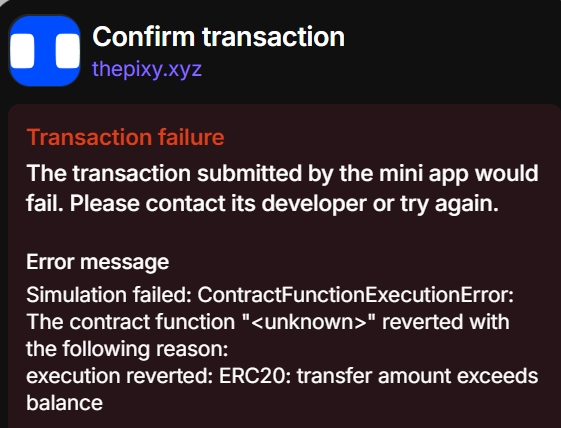
⚠️ Note: Make sure you have **enough USDC** in your wallet to enter POT. You will also need a small amount of **ETH to pay the network fee**.
⚠️ Note: Make sure both USDC and ETH are on the **Base Network**.
Otherwise you will receive the following error:
After the round is filled, the lottery is carried out completely automatically by the smart contract, and the POT amount is sent directly to the winner's wallet. (Platform Fee is 5%)

.jpg?alt=media&token=10e19a06-f6d1-447d-a1a1-efe19f063701)